
Tabby Browser Wellness Companion

Your browser,

finally breathing easy.

Your browser companion that helps Chrome rest before it slows down — with a cat that actually shows you what's going on.

Add to Chrome See features

One-time payment · No subscription · Works on Chrome, Edge & Brave

Auto
Tab sleeping
Safe
Protected tabs
Zero
Data collected
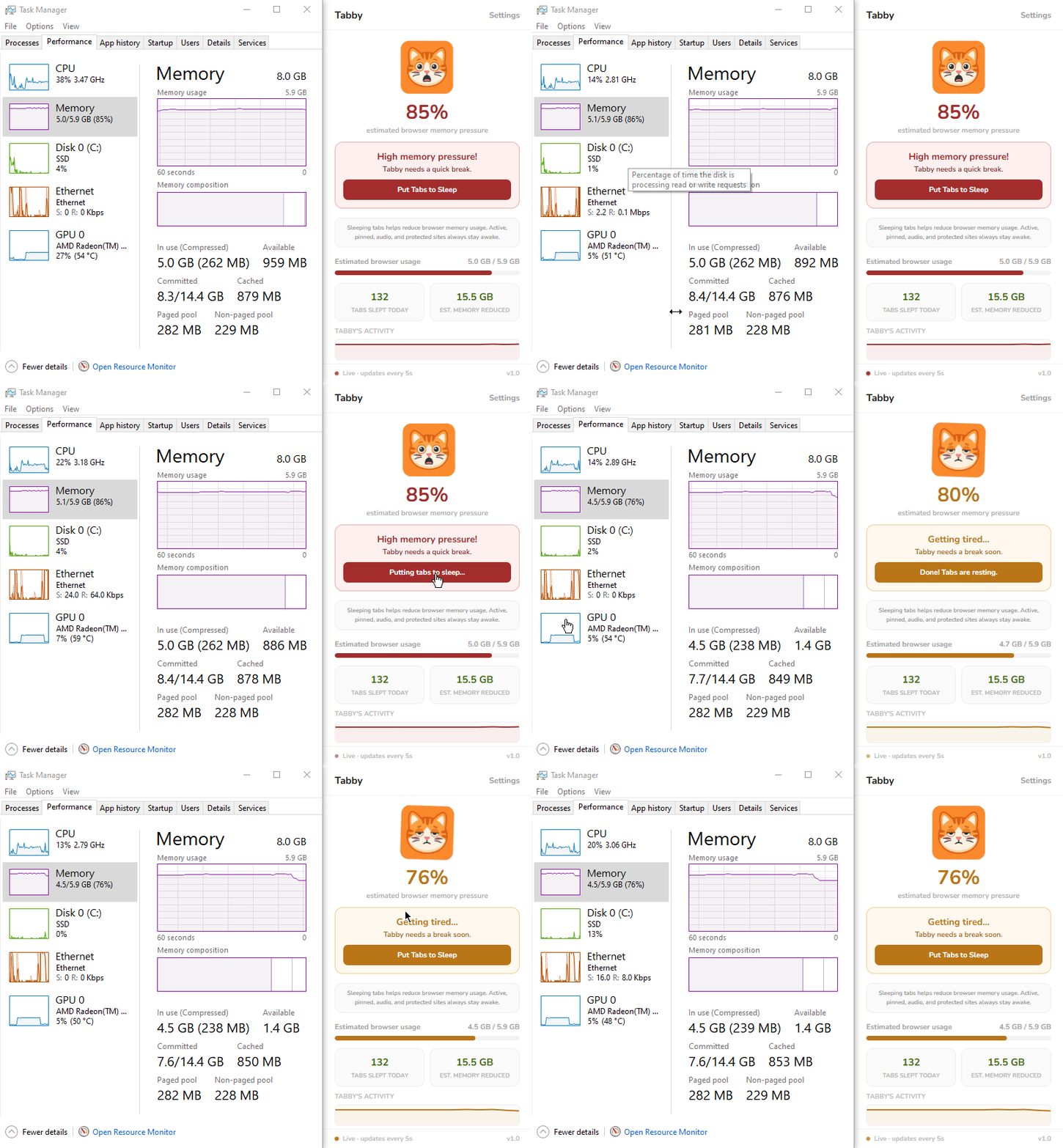
Simple, smart, and automatic.

Tabby runs quietly in the background. No setup needed. Just install and let the cat do its job.

1

Install Tabby

One click. No account. No permissions beyond what's needed. Ready immediately.

2

Tabby watches your memory

The cat companion shows your browser's health in real time — happy, tired, or stressed.

3

Idle tabs go to sleep

Tabs you haven't touched are gently rested. They reload instantly when you need them back.

4

Your browser stays fast

Less memory pressure. Smoother browsing. A happier cat — and a happier you.

Everything your browser needs. Nothing it doesn't.

Lightweight, private, and does exactly what it promises.

Mood-Based Companion

Tabby's mood changes based on your browser's memory pressure. Happy and bouncing when calm. Stressed when things get heavy.

Smart Tab Sleeping

Tabby waits until tabs are truly idle before putting them to sleep. No aggressive discarding — just gentle, intelligent resting.

Protects What Matters

Active tabs, pinned tabs, and tabs playing audio are never touched. Music, calls, and podcasts keep running. Add your own sites to the whitelist too.

Daily Insights

See tabs slept and memory reduced today. Resets every morning so you always know what Tabby did for you.

Fully Customizable

Set your own thresholds. Name your companion. Add protected sites. Tabby adapts to exactly how you work.

Private & Lightweight

Zero browsing data collected. No servers. Runs only when your browser is open. Your tabs and history stay completely private.

Intelligent Autopilot

Tabby checks more frequently when your browser is stressed and slows down when things are calm — saving resources while staying responsive.

Auto RAM Detection

Tabby automatically scans your system memory and sets smart default thresholds based on what your device can actually handle — no manual setup needed.

Manual Sleep Button

Need instant relief? Hit "Put Tabs to Sleep" and Tabby aggressively clears all idle tabs right now — no waiting, no timers. You're always in control.

Mood system

Tabby always knows how your browser feels.

Three states. Three behaviors. Always adapting to keep your browser healthy.

Happy Tabby
All good!

Memory is comfortable. Tabby is bouncing happily. No action needed — just enjoying the calm.

Below comfort threshold
Tired Tabby
Getting tired...

Memory is climbing. Tabby starts watching closely and quietly puts idle tabs to sleep every 2 minutes.

Approaching pressure zone
Panicking Tabby
High pressure!

Memory is critical. Tabby acts immediately — sleeping all eligible tabs to bring things back under control.

Above pressure threshold
Pricing

Simple, honest pricing.

Pay once. Own it forever. No subscriptions, no hidden fees.

Tabby One-time purchase
$4.99

One-time · All future updates included · No subscription ever

Mood-based cat companion
Smart autopilot tab sleeping
Manual "Put Tabs to Sleep" button
Audio & pinned tab protection
Protected sites whitelist
Daily stats & resting history
Custom thresholds & name
Works on Chrome, Edge & Brave
Zero data collected
All future updates free
Add to Chrome — $4.99
FAQ

Questions answered.

Will Tabby close my tabs permanently?+
No. Tabby puts tabs to sleep — they stay in your tab bar and reload instantly when you click them. Nothing is ever permanently closed or lost.
Which tabs are protected from sleeping?+
Active tabs, pinned tabs, tabs playing audio, and any sites you add to your protected list are never put to sleep. Your calls, music, podcasts, and docs are always safe.
What's the difference between autopilot and the sleep button?+
Autopilot is gentle — it waits for tabs to be idle and protects audio tabs so your music never stops. The "Put Tabs to Sleep" button is the emergency override: it acts immediately and clears everything it can, including paused media, to free memory as fast as possible.
Does Tabby collect any of my browsing data?+
Absolutely not. Tabby collects zero browsing data. Everything runs locally in your browser. Your tabs, history, and activity are never sent anywhere.
Does it work on Edge and Brave?+
Yes! Tabby works on all Chromium-based browsers — Chrome, Microsoft Edge, Brave, Opera, and Vivaldi.
Why is my cat stressed?+
Your browser memory is running high! Click "Put Tabs to Sleep" to help Tabby relax, or let autopilot handle it. Tabby will calm down once memory pressure drops.
Privacy Policy

Your data stays yours.

Last updated: May 2026

Tabby collects zero personal data. Your browsing history, tabs, and activity never leave your device. The only external connection Tabby makes is to verify your license key at activation.

No browsing data collected

Tabby does not collect, store, or transmit any personal data, browsing history, or user information of any kind.

Local storage only

All settings and daily stats are stored exclusively on your device using Chrome's built-in storage API. This data never leaves your browser.

License verification only

Tabby connects to LemonSqueezy solely to verify your purchase license key.

No account required

Install and use immediately. No sign-up, no login, no email address needed — ever.

What Tabby accesses

  • Browser tab information — to know which tabs are idle or active
  • Memory pressure data — standard data available to all Chrome extensions
  • Your settings — stored locally, never transmitted
  • Your license key — sent to LemonSqueezy only to verify your purchase

What Tabby never does

  • Send your browsing data to any server
  • Track your browsing history or visited URLs
  • Read the content of any web page
  • Use third-party analytics or tracking scripts
  • Share your data with any third party

Questions about this policy?
Reach out and we'll respond promptly.

Contact us →